How Does decoding=“async” Actually Affect LCP?
If you’re a web developer you’ve probably noticed that <img> tags sometimes have a decoding property
set to “async”. Some libraries, like WordPress, Next.js, and Astro even add this property by default to their images1.
You might’ve wondered what this actually does and what warrants
applying it to images so liberally. And if you’re a performance nut, you might’ve wondered if this is a
harmful thing to have on your LCP image. As one of those nuts, it always bugged me that I never had a great
sense of how this was impacting things. It sounds very technical and important to the loading of the image,
so surely there must be an optimal setting for performance. Is this property hurting my LCP? As it turns
out…no, but yes, kind of. Let me explain.
According to the MDN docs, the decoding property on an image tag simply gives a hint to the browser on “whether
it should wait for the image to be decoded before presenting other content updates or not”. Ok, so it’s telling the
browser if it should prioritize decoding this image or work on other things, easy. So how does this affect page
performance? Searching for the answer in web performance circles seems to point towards “async” being bad. Paul Calvano listed async
decoding as a common performance mistake in his 2024 performance.now() talk.
Joan Leon wrote on his blog
that sync decoding was optimal for the LCP image. Karolína Vyskočilová has a whole blog post
titled “The Unintended Consequences of decoding=’async’ on Your WordPress site’s LCP”. So far so good. But hang on.
Karolína’s blog post has a disclaimer at the top. It says that she talked with the WordPress
performance team. They had come the conclusion that it wasn’t harmful to LCP, and in fact it might lead to an improvent.
That’s good news then.........wait an improvement? This is the moment that really broke my brain. I can buy that the
effect on LCP would be negligible, enough to not worry about as a default. But how in the world could deferring critical
work make LCP faster? LCP is supposed to measure how long it took the LCP element to load. How would deprioritizing the
decoding of that element possibly help?
Desperately searching to preserve my sanity lead me to Barry Pollard’s excellent article on the topic, helpfully called
What does the image decoding attribute actually do?.
As it turns out, the decoding property is not so intuitive. Above I misled you a bit about that MDN description.
The property doesn’t affect the timing of the image decoding at all. You see, image decoding is actually always
handled in a separate thread. It isn’t prioritized or de-prioritized by this property. The thing you control is whether the
browser renders additional frames while the image is being decoded. The browser will render frames before decoding, it will
render frames after decoding, but during decoding it needs to know: should it wait for this decoding image or not? The time
required to decode the image will be the same in either case. The only difference is whether we defer showing other content
updates while this happens. So the actual choice to make isn’t really performance related, it’s UX related. Allowing frames to
be generated during decoding can show the page without the image loaded, or partially loaded. 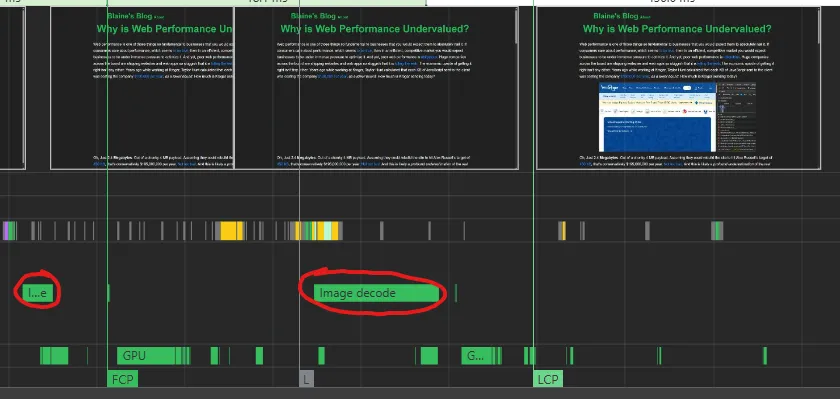
As Barry mentions, there’s no right or wrong answer here. If you have some part of the page that you want to stay animated while the LCP image is loading, then “async” is what you need. If you want the image to look more in sync with the rest of the page load, then “sync” is right. Barry actually mentions that he prefers Chrome’s “sync” default. The MDN docs also say that “sync” decoding looks more “correct”. I’ll go further and say that for the LCP image you almost always want it to use “sync”. It simply looks worse if the most important element of the initial page load is out of sync with the rest of the page. This is also why it’s important to load an appropriately sized image with responsive images. But, remember what the WordPress team said: “sync” decoding leads to a worse LCP on average. So yes, I’m making the rare concession that you should ignore the metric. Focus on the user, that’s what the metrics are ultimately for. But still, why should I even have to choose? Why does “async” decoding lead to a slightly better LCP?
I spent ages running performance traces in DevTools over and over again. I wanted to be able tell you exactly when LCP
was getting marked and exactly what was happening sooner in the “async” case. After significant trial and error I can say with
some confidence that the “async” LCP is…just inaccurate. Only slightly, but still, inaccurate. Look at this trace of a “sync”
decoded image: 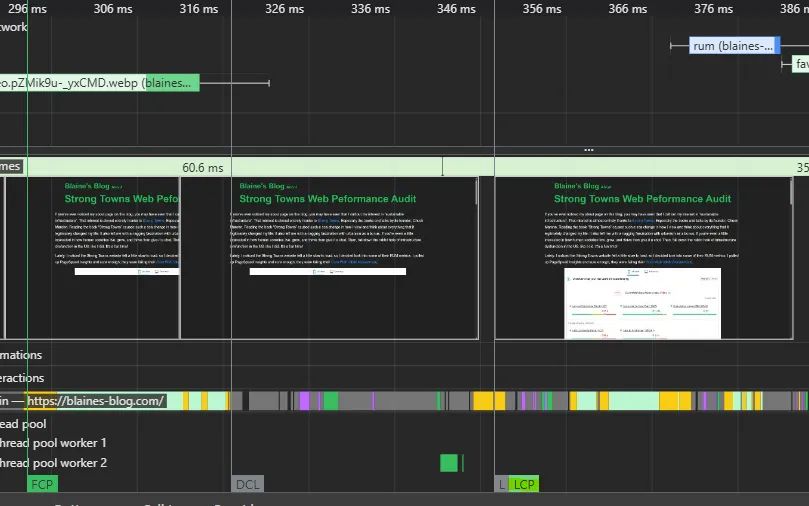 Note the highlighted
“LCP” marker. See how it closely hugs the left side of the fully-loaded image frame. This is a very accurate marking, as it is
the moment when the LCP image is fully presented to the user. When using “sync” decoding, LCP gets marked within a few ms of
that moment every single time. It’s honestly pretty wild how accurate it is. For “async” decoding, this is not so. Here’s a
trace of a page load with “async” decoding:
Note the highlighted
“LCP” marker. See how it closely hugs the left side of the fully-loaded image frame. This is a very accurate marking, as it is
the moment when the LCP image is fully presented to the user. When using “sync” decoding, LCP gets marked within a few ms of
that moment every single time. It’s honestly pretty wild how accurate it is. For “async” decoding, this is not so. Here’s a
trace of a page load with “async” decoding: 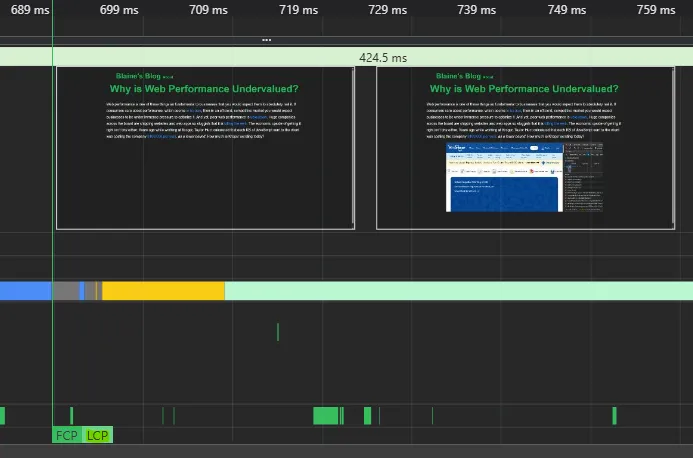 Here the fully loaded frame is marked at 729ms, but the “LCP” marker shows up at ~690ms, nearly 40ms before the image actually
looks done to the user. In fairness this run used DevTools to throttle the CPU by a 20x slowdown, which seems to exaggerate the
effect. The effect is inconsistent though, some runs looks exactly like the “sync” images with LCP marked perfectly.
Here the fully loaded frame is marked at 729ms, but the “LCP” marker shows up at ~690ms, nearly 40ms before the image actually
looks done to the user. In fairness this run used DevTools to throttle the CPU by a 20x slowdown, which seems to exaggerate the
effect. The effect is inconsistent though, some runs looks exactly like the “sync” images with LCP marked perfectly.
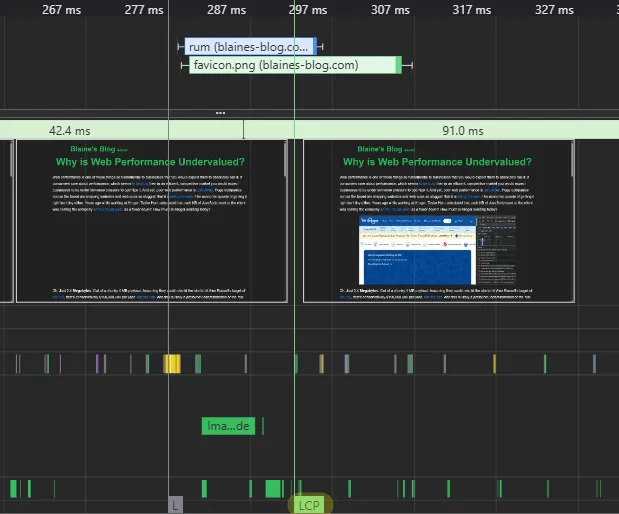
The LCP marker is just more random when using “async” decoding. I believe this is how you would get a 6.7% LCP reduction when averaging out many runs, as Weston Ruter from WordPress found. It’s not so clear to me why a more constrained device would report the LCP too soon though. I could believe that a marker would get delayed somehow, but a marker getting more optimistic is odd behavior. Alas, the inner workings of Chrome2 are an enigma…
So, where does that actually leave us performance nuts? We know that the decoding attribute doesn’t actually affect image load timing. It might help LCP, but only superficially. The user experience for the LCP image favors “sync” decoding, and only the most metric-crazed dev would sacrifice that for an LCP boost. But, like Barry mentions, the effect of this attribute is small. So small that different browsers even disagree on which setting makes a better default. Compared to lazy-loading or image size, this just isn’t that impactful. So if your LCP image is “async” decoded it’s not something you need to worry much about. You even get to enjoy marginally better LCP ratings. Being the performance nut that I am though, I want my pages to look and feel fast. I’m gonna be sticking “sync” on my LCP image every time.
- Referring to Astro’s Image and Picture components[return]
- It should be noted that I only tested all of this in Chrome, so it could Chromium-only quirk.[return]